
Automation for online coaches
Set up a program once. It releases itself day by day.
Put programs, tasks and questionnaires on a course timeline once, and Coachplan releases each one on the right day, from each client's own start date. You keep the coaching. On the side, new clients get their welcome email automatically, monthly payments are collected through Stripe, and recurring tasks repeat on their own.
No credit card required · cancel anytime · 30 days free
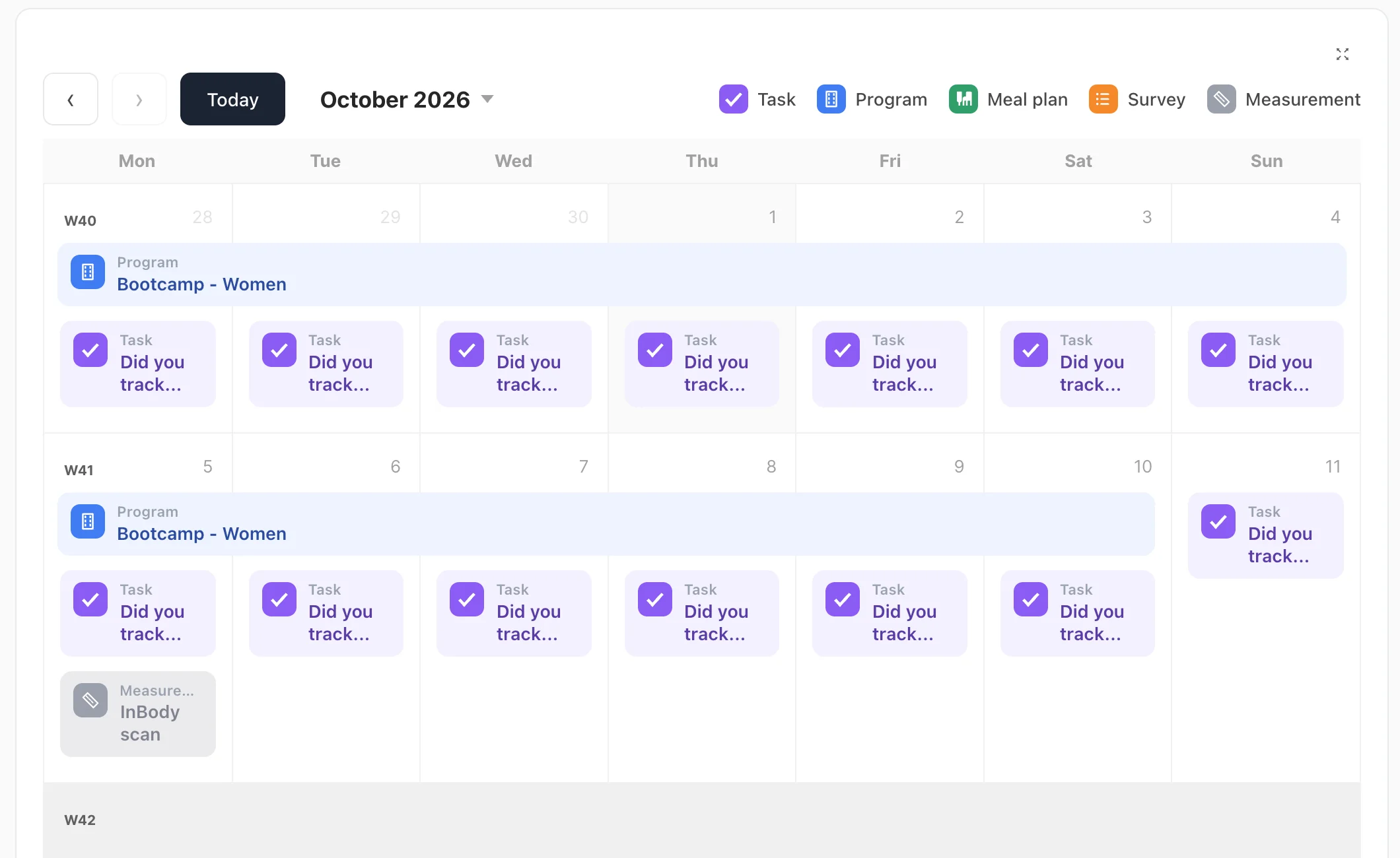
Automation for online coaches means the routine parts of coaching happen on schedule without you sending them: next week’s program, the weekly photo task, the monthly invoice. In Coachplan, you build a course once and each step is released to the client on the day you set. You still decide what goes in and when.
It’s not the coaching that drains you. It’s everything around it.
Sending next week’s program, reminding people to check in, chasing a payment, setting up a new client. Every one of those is small. Together they eat your week.
Without Coachplan
- Next week’s program sent out by hand, client by client
- Login details written and sent for every new client
- The same weekly task requested over and over
- Invoices and payment reminders every month
With Coachplan
- Course steps released automatically, day by day
- Welcome email sent automatically when a client is created
- Recurring tasks that repeat on your schedule
- Monthly payments collected through Stripe
Who gets the most out of automation?
Online coaches
Run one well-built 12-week course for many clients, each starting on their own date, without sending anything by hand.
Personal trainers
Keep clients moving between sessions with programs and tasks that arrive on schedule.
Physiotherapists
Lay out rehab week by week, so patients always know the next step and you don’t have to send it.
How automation works in Coachplan
Four things that run without you, once they’re set up.
Course timeline
Plan the whole course on one timeline
Place workout programs, tasks, questionnaires and meal plans on the days they should happen. Build it once and reuse it for every client who starts the course.
The whole course planned in one place, not in scattered documents
What runs automatically, and what stays with you
Day-by-day course release
Programs, tasks and questionnaires are released on the day you set, once a client is enrolled in the course.
Follows each start date
Individual courses line up with each client’s own start date, so everyone gets the course at their own pace.
Automatic welcome email
Every new client receives a welcome email with their login the moment you create them.
Purchase creates the client
Sell a program or course and the buyer is set up as a client automatically, with the content ready at first login.
Monthly billing via Stripe
Subscriptions are charged every month through Stripe, so you’re not sending invoices or chasing payments.
Spot clients drifting away
Coachplan tracks client activity automatically and flags who is at risk of dropping off in your client list, so you can step in early.
Automation vs doing it all by hand
Questions about automation
Four things: releasing course steps (programs, tasks, questionnaires) day by day once a client is enrolled, the welcome email when you create a client, monthly billing through Stripe, and recurring tasks. When someone buys a program or course, they are also created as a client automatically.
Partly. The welcome email with the client’s login is sent automatically, and buyers of a program or course are set up automatically with the content ready. Beyond that, you decide what to assign and when, for example by enrolling the client in a course.
Yes. Put the programs on a course timeline and each one is released on the day you set. Individual courses follow each client’s start date.
No. You place steps on a timeline and pick the day. There’s no code and no integrations to maintain.
Yes. Assign one course to a whole group. Everyone follows the same plan, and each client keeps their own log.
If you want a head start, you can switch on AI help to get a first draft. It’s optional, and you always shape and approve the course before a client sees it.
Ready to stop doing the same admin every week?
Try Coachplan free for 30 days. Build your first course, set the release days, and let the routine run while you coach.
Start your free 30-day trialNo credit card · 30 days free · cancel anytime
Coachplan for your role
Considering alternatives?